
Reliable audits for JavaScript-rendered SEO
SEO JS Checker is a Chrome extension that helps you identify critical JavaScript-related SEO issues. It fetches the page’s raw HTML and compares it to the live, client‑rendered DOM, highlighting differences across head tags, visible text, and links. Use it to quickly spot SEO risks introduced by client‑side rendering.
Quick overview
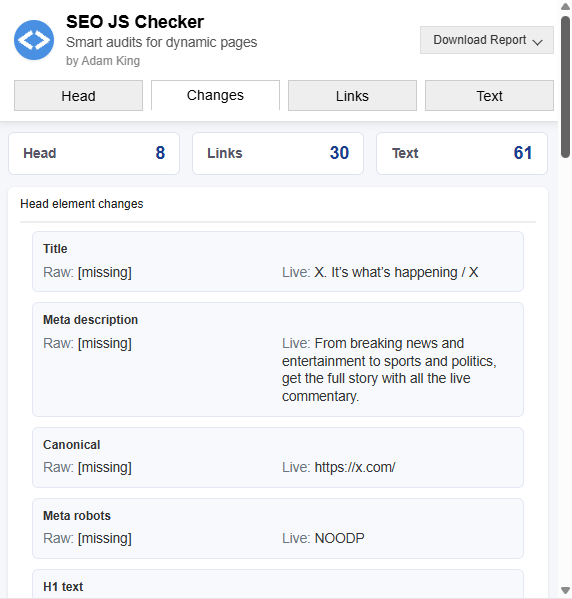
Why SEO JS Checker?
Modern websites often rely on JavaScript to inject or modify critical HTML tags, from meta descriptions and canonical URLs to structured data and internal links. While convenient for development, this poses real risks for SEO. Search engines may see different content than users if critical tags or text only appear after JavaScript runs, or if server responses differ from the final DOM.
This tool makes those gaps obvious and fast to debug. SEO JS Checker compares the raw HTML delivered by your server against the rendered DOM in your browser, so you can:
Every difference is clearly labelled and grouped, with collapsible sections that make the report easy to scan.
Designed for real-world debugging
SEO JS Checker isn’t just a visual diff tool – it’s built to support practical debugging for dynamic sites:
Who it’s for
This tool is ideal for:
Features
How it works
No setup required – everything runs in your browser, on any valid HTTP or HTTPS page.
Built with clarity and control
SEO JS Checker is intentionally minimal and transparent in its output. There are no external dependencies, no data collection, and no reliance on third-party APIs. Everything happens in-browser, using the page you’re viewing.
Developed by Adam King
This plugin was built by Adam King, a technical SEO consultant with over a two decades of experience helping websites navigate complex SEO issues, including JavaScript and indexing challenges.
Install now
You can get the extension from the Chrome Web Store.
- Open Chrome and go to the Chrome Web Store.
- Search for SEO JS Checker or visit
https://chromewebstore.google.com/detail/seo-js-checker/mllilfpgoolaefgngamnamojfgpggglo. - Click Add to Chrome and confirm.
- Navigate to any web page and click the extension icon to run your first audit!
Copyright © 2025 Adam King